
The SnowCoder MCP server exposes programmatic access to SnowCoder and the Yeti agent as a single JSON-RPC 2.0 endpoint over HTTP, with a catalog of named tools you discover at runtime. There is no OpenAI-style /chat/completions surface; you call tools by name, from any MCP client. Claude Code, Cursor, a Vertex AI agent, or a custom client you wrote yourself all speak to the same endpoint, and all of them can drive real delivery: create a project, save requirements, prepare and approve build plans, run the build, and deploy the result to a ServiceNow instance.
That last clause is where every platform architect stops reading and starts frowning. An AI client with credentials that reach your ServiceNow instance is, on its face, a risk. Agents are fast, confident, and tireless, and an agent that can deploy is an agent that can deploy the wrong thing at machine speed. We have written before about the three risks of AI-generated ServiceNow code; giving the agent an API makes the second of those risks, uncontrolled change, the headline concern.
So the design question for the API was never "how do we let agents deploy?" It was "how do we let agents do everything up to the deploy, and make the deploy itself impossible without a separate, explicit approval call?" The answer is a governed lifecycle in which deployment is its own explicitly approved step, and the approval is enforced by the server. This post walks through how it works and what it means for anyone integrating.
The governed lifecycle, tool by tool
Building through the API is a governed pipeline, not a single call. Nothing writes to your instance until the final, separately approved stage. The chain looks like this:
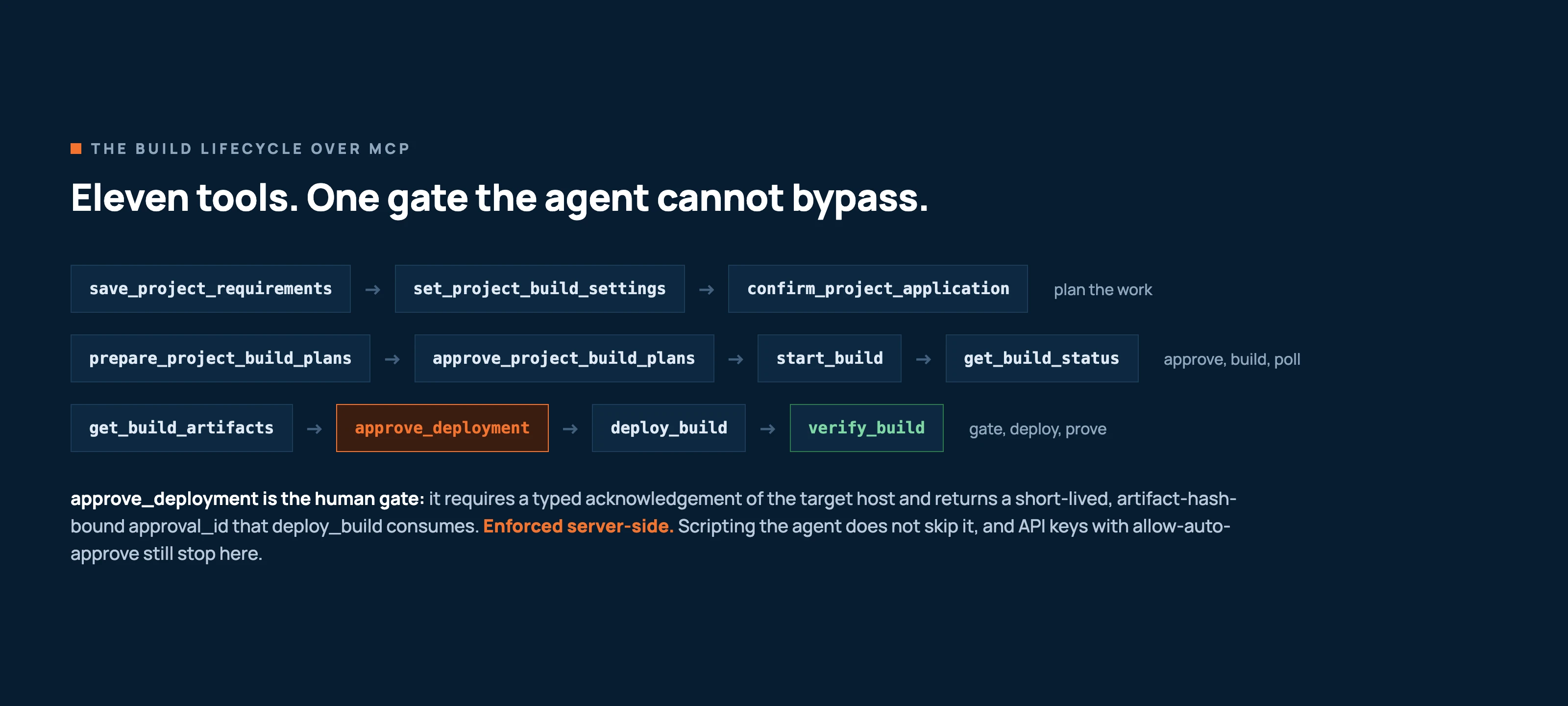
Four properties of this pipeline matter more than the tool names:
- Requirements are immutable whole-set revisions.
save_project_requirementsreplaces the project's epics and stories with a new immutable revision. There are no row-level story edit tools, so there is no way for an agent to quietly nudge one arbitrary detail after sign-off. The requirement set you approved is the requirement set that builds, and it takes anidempotency_keyso retries are safe. - Plans are prepared, then explicitly approved.
prepare_project_build_plansproduces the plans;approve_project_build_plansis a separate call that accepts them. Destructive findings surface at plan approval, so the moment a plan would remove or overwrite something is the moment a reviewer sees it, before any build starts. - The build runs server-side as a V5 delivery.
start_buildkicks off a run tracked bydelivery_idandjob_id, with responses carryingpipeline_version: "projects_v5". The client watches; the pipeline does the work. - Deployment is its own approved step. This is the key claim, and it deserves its own section.
The gate the agent cannot bypass
When the build has finished and the artifacts are ready, deploying them to your instance requires approve_deployment. That call demands a typed acknowledgement of the target host: the approver states, explicitly, which instance they are authorising. In return it issues an approval_id that is short-lived and bound to the artifact hash. deploy_build consumes that approval_id. After the deploy, verify_build confirms post-deploy convergence, so "it deployed" and "what we approved is what is running" are both checked.
Consider what that design closes off. An agent cannot skip the gate, because deploy_build without a valid approval_id fails server-side with a lifecycle-order error (DEPLOYMENT_APPROVAL_INVALID). It cannot approve against one host and deploy to another, because the acknowledgement names the host. It cannot hold an old approval and reuse it later against different output, because the approval_id is bound to the artifact hash and expires. And it cannot be waved through by configuration: API keys can carry an allow-auto-approve flag, and the integration guide is explicit that this flag does not bypass the deployment approval step. That approval always requires an explicit call. A fully scripted agent with a full-access key still cannot skip this gate: deploy_build only runs after a separate approve_deployment call that names the target host, and that call cannot be waved through by prompt or configuration, because the gate lives in the server, not in the client's prompt.
This is the same fail-closed posture as the rest of SnowCoder, applied to the API surface: the deployment approval is a call the server requires, and no client, scripted or not, gets a shortcut around it.
Practical notes for integrators
A governed pipeline changes how you write the client. A few things worth building in from the start:
| Concern | What the API gives you |
|---|---|
| Safe retries | start_build takes an idempotency_key. Retrying with the same key is safe; a changed payload under the same key returns IDEMPOTENCY_PAYLOAD_MISMATCH rather than silently starting something different. |
| Progress | The MCP path is non-streaming: each call returns one complete payload. Long-running work is asynchronous, so start it, then poll get_build_status, and read get_project_events for the ordered pipeline event stream. |
| Credentials | API keys grant full tool access with no scope restriction; OAuth 2.1 tokens are scope-limited, with a default grant of mcp:read mcp:write. For shipped integrations, prefer OAuth with the narrowest scopes the client needs; the OAuth 2.1 and PKCE post covers rotation and replay detection. |
| Rate limits | 200 requests per minute per credential; back off on 429. |
| Timeouts | Set generous HTTP timeouts. Guru-mode answers can take one to two minutes (verified around 113 seconds), so allow at least 180 seconds. |
One error worth calling out for teams with older integrations: pre-V5 project UUIDs return PROJECT_NOT_FOUND. List current projects first rather than replaying stored identifiers. The v2.0 migration notes cover the renamed and replaced tools in detail.
What this unlocks
The interesting consequence of a server-enforced gate is that everything before the gate can be safely automated. You can let an agent in Claude Code draft requirements, prepare plans, and run builds overnight, as in our Claude Code walkthrough, and the worst it can do is produce artifacts that wait for review. The effort concentrates where it belongs: reading the plan, acknowledging the target host, and approving the deployment. Approval stops being a rubber stamp buried in a wall of automation and becomes the one deliberate, separate act in the chain.
For architects, that is the pitch in one sentence: give the agent the whole pipeline, and keep the instance behind a gate that no prompt and no configuration flag can bypass, because deployment always takes a separate, explicit approval call that names the target host. Setup for Claude Code and Codex, plus the connection details, tools, and safety reference, is on the API reference page, and the broader MCP story, including supported clients, is at SnowCoder MCP.