
Why a Ten-Stage Pipeline and Not One Big Prompt
A common temptation in 2026 is to wrap everything in one large agent and let it think. That works for prototypes. It does not work for delivery into real ServiceNow instances where each artifact must be valid, secure, performant, and packaged into the right Update Set.
The Yeti Build Agent pipeline is deliberately split into ten observable stages. Each stage has a single responsibility, a clear handoff format, and explicit pass/fail criteria. When something goes wrong, the operator can see which stage failed and rerun just that stage rather than restarting the whole job.
This article walks through each stage in order: what goes in, what comes out, and how each one contributes to the 100% pass rate verified nightly by the 291-story build benchmark.
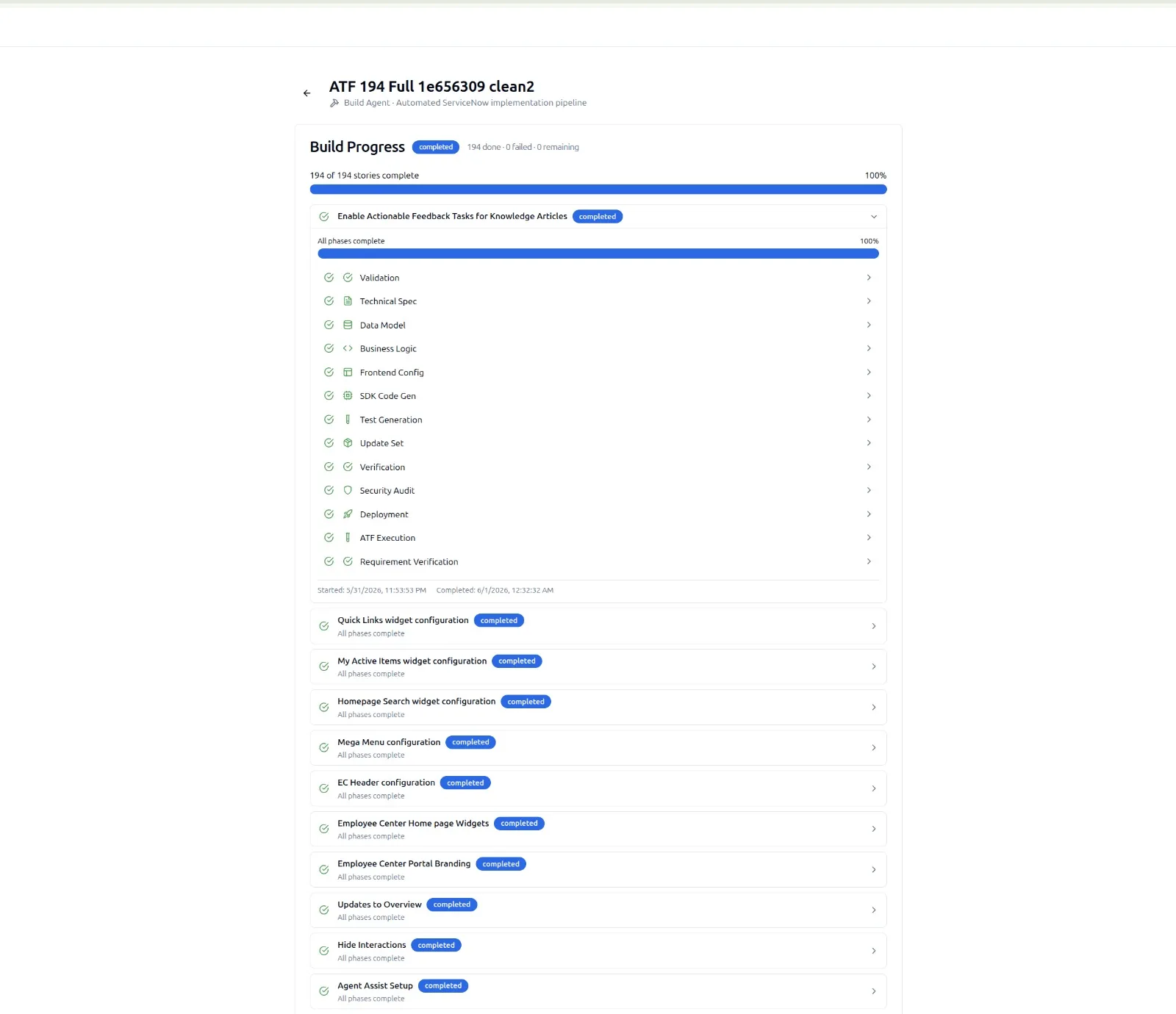
Stages 1-3: From Backlog to Data Model
The first three stages turn a story into something a machine can act on.
Stage 1: Validation
The Validation stage ingests stories from the backlog and checks each one for ambiguity, missing acceptance criteria, and conflicts with existing instance configuration. Stories that fail validation are returned to the author with structured feedback rather than silently passed to later stages.
Stage 2: Technical Spec
The Technical Spec stage turns each validated story into an implementation plan grounded against the live instance schema. The spec names the artifact types to produce, the tables and fields involved, the security model, and the test approach.
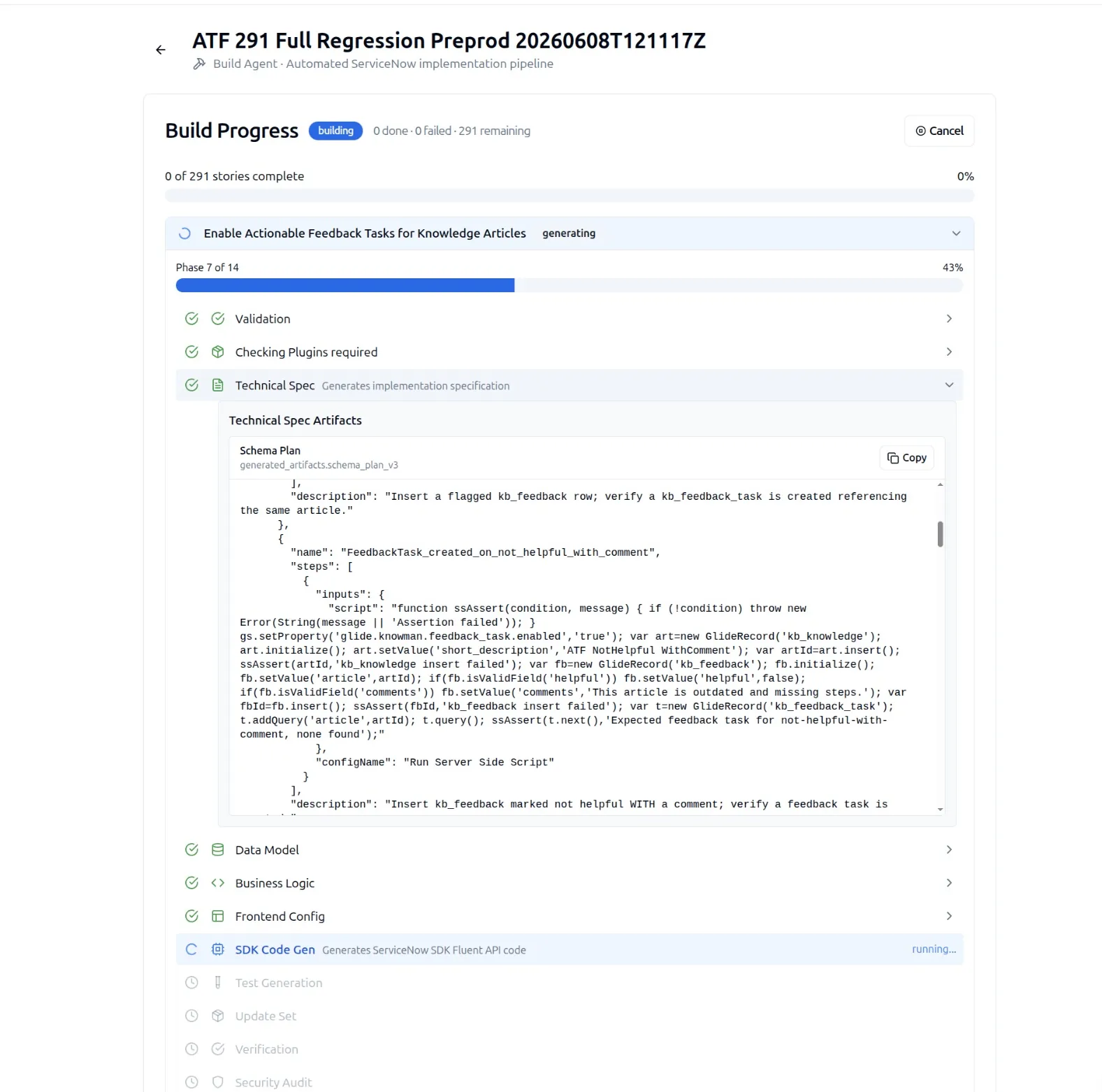
Stage 3: Data Model
The Data Model stage emits the table, column, choice list, and relationship definitions that the story requires. Existing data model elements are reused rather than duplicated. The output is a Fluent SDK data model file ready for downstream stages.
import { Table, Column } from '@servicenow/sdk/global';

Table({
    name: 'x_acme_reservation',
    label: 'Reservation',
    extends: 'sys_metadata',
    columns: {
        asset:      Column({ type: 'reference', reference: 'cmdb_ci' }),
        start_time: Column({ type: 'glide_date_time', mandatory: true }),
        end_time:   Column({ type: 'glide_date_time', mandatory: true }),
        notes:      Column({ type: 'string', max_length: 2000 })
    }
});
Stages 4-5: From Data Model to Working Application
Stage 4: Business Logic
The Business Logic stage generates the server-side behavior of the application: Business Rules, Script Includes, Scheduled Jobs, and Fix Scripts. Each script is generated with release-correct GlideRecord and GlideAjax patterns and validated against the syntax and security checks from the SnowCoder validation pipeline.
Stage 5: Frontend Config
The Frontend Config stage handles forms, lists, UI Policies, UI Actions, Client Scripts, and Service Portal widgets. The same release-grounded approach applies: client-side scripts call the Script Includes generated in stage 4, not invented APIs.
import { ClientScript } from '@servicenow/sdk/global';

ClientScript({
    name: 'Warn on overlapping reservation',
    table: 'x_acme_reservation',
    type: 'onChange',
    field: 'end_time',
    script: function onChange(control, oldValue, newValue, isLoading) {
        if (isLoading || !newValue) return;
        var start = g_form.getValue('start_time');
        if (start && newValue <= start) {
            g_form.showFieldMsg('end_time', 'End must be after start', 'error');
        }
    }
});
Stage 6: Fluent CodeGen
The Fluent CodeGen stage takes the artifacts from the previous stages and assembles them into a deployable @servicenow/sdk project. This is the stage where SnowCoder's 42 target artifact types are rendered into supported Fluent APIs or generated platform metadata. The output is a directory structure that can be cloned, committed to git, and validated against the target instance family.
The structure of the generated project is conventional, so anyone familiar with the Fluent SDK can read it without context from the pipeline.
my-application/
├── package.json
├── now.config.json
├── src/
│   ├── tables/
│   │   └── x_acme_reservation.ts
│   ├── business-rules/
│   │   └── block-double-booking.ts
│   ├── client-scripts/
│   │   └── warn-overlap.ts
│   ├── ui-policies/
│   ├── flows/
│   └── atf-tests/
│       └── reservation.atf.ts
└── README.md
Stage 7: ATF Testing
The ATF Testing stage generates Automated Test Framework tests for every artifact and executes them against the target instance. Test data is created in the right scope, assertions map to platform conditions, and the entire test suite runs as part of the pipeline rather than as a downstream activity.
A failing test stops the pipeline. The operator sees the failed step in the dashboard with the same diagnostics ServiceNow shows for any ATF run. The pipeline can be resumed once the failure is addressed.
Stage 8: Update Sets and Verification
The Update Sets and Verification stage takes the Fluent SDK project and assembles a clean Update Set ready for export. The stage also verifies the Update Set by replaying it into a clean sandbox and checking that every artifact lands as expected.
The verification pass catches the kind of mistake that traditional manual delivery only discovers in UAT: a missing related record, a customer-scope reference that should have been global, or a choice list entry that exists in dev but not in the bundle.
Stage 9: Security and Script Audit
The Security and Script Audit stage runs the bundle against the same 500+ granular checkpoints used by SnowCoder's Instance Audit. The checkpoints cover ACL coverage, query performance, XSS prevention, scope leakage, and many other categories.
Findings are returned as a structured report. Critical findings block deployment until they are resolved. Lower-severity findings are surfaced but do not block.
Stage 10: Deployment
The Deployment stage installs the verified Update Set into the chosen target instance. The operator can choose any registered instance and the pipeline applies the change with full audit logging.
Because the bundle was already verified in a sandbox in stage 8, the deployment is deterministic. Rollback is a single click that reverses the Update Set.
Why the Pipeline Holds Up at Scale
The pipeline is verified nightly against the 291-story build benchmark at 100% pass rate. The benchmark covers the full breadth of artifact classes and runs end-to-end through all ten stages. Regressions are caught inside SnowCoder before they reach customer pipelines.
The combination of small, observable stages and a real benchmark is what makes the pipeline reliable in production. Each stage can be inspected, replayed, and trusted on its own.