
Why This Upgrade Has More Friction Than You Expect
Zurich is the lowest release SnowCoder supports, which is not an accident. Most production instances on Zurich have been upgraded through several previous family releases, so the risk is rarely Zurich itself. It is the accumulated customisation: scoped applications layered on top of OOB, store apps that were last reviewed at install time, ACL changes nobody can explain, and Update Sets that were partially backed out and never cleaned up.
Moving that to Australia means walking every one of those layers and asking three questions: does it still need to exist, does it still work, and does it conflict with anything Australia changes. The checklist below is the structured way to answer those questions before you book a clone-and-upgrade window.
The SnowCoder Upgrade Readiness Agent does most of the discovery automatically, then produces a scored audit report and an AI-Enhanced backlog of remediation stories. The checklist describes what the agent pulls, what you still need to decide manually, and how the outputs flow into a delivery plan.
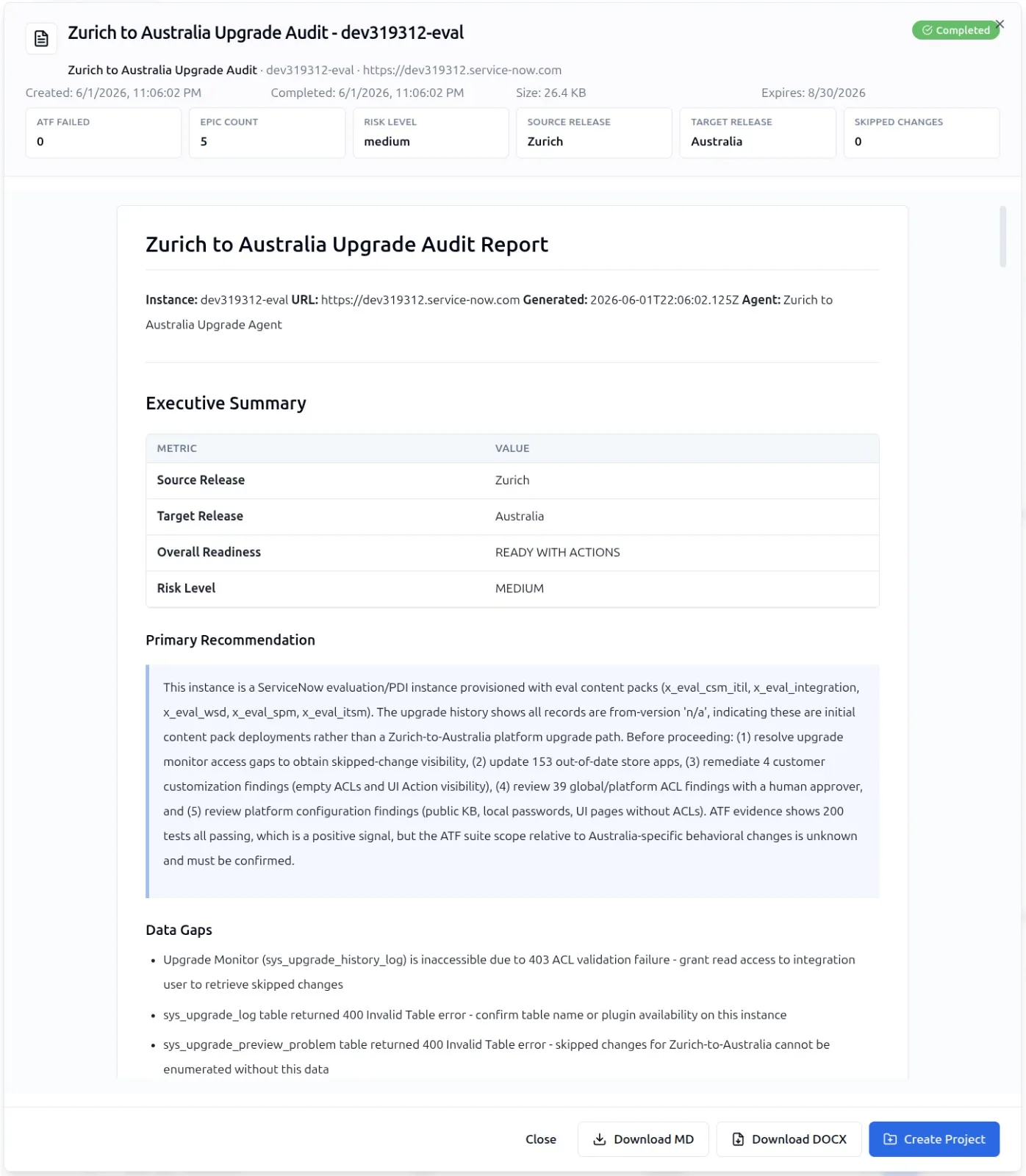
The Inputs the Upgrade Readiness Agent Pulls
The Upgrade Readiness Agent does not guess. It assembles a complete picture from six concrete data sources on the source instance.
- Upgrade Center: Pending skips, conflicts, and OOB merge decisions
- sys_upgrade_history_log: Every prior upgrade outcome, including failures and rollbacks
- Instance scan results: Health diagnostics, security findings, and best-practice violations
- Plugins: Active plugins, version pinning, and license usage
- Store apps: Installed store apps, version state, and compatibility flags
- Update sets: Open and committed update sets, including back-outs and partial commits
These six inputs feed a single audit report with a numeric readiness score and a category breakdown that maps directly to remediation stories.
The Pre-Upgrade Checklist
Below is the checklist that SnowCoder customers use ahead of a Zurich-to-Australia move. Items marked "agent" are automated by the Upgrade Readiness Agent. Items marked "human" require a decision in Yeti Chat or a workshop.
Phase 1 - Discovery
====================
[agent] Pull sys_upgrade_history_log and classify
        previous upgrade incidents
[agent] Pull Upgrade Center conflicts and skips
[agent] Run an instance scan and capture the report
[agent] Run the most recent ATF suite and capture results
[agent] Inventory plugins with version + activation date
[agent] Inventory store apps with version + compatibility
[agent] List open and unprocessed update sets
[human] Confirm whether any update sets are intentionally
        held back

Phase 2 - Customisation Audit
=============================
[agent] Identify customisations on OOB tables that will
        merge in Australia
[agent] Flag legacy Workflow records (Legacy Workflow
        is in maintenance)
[agent] Identify ACLs added against tables that have
        OOB ACL changes in Australia
[agent] Identify scoped applications with stale
        dependency versions
[human] Decide retire/refactor/keep for each
        flagged customisation
[human] Confirm Service Portal widget set in scope

Phase 3 - Integration Surface
==============================
[agent] List active inbound REST/SOAP integrations
[agent] List MID Server instances and version
[agent] List active IntegrationHub spokes
[human] Confirm each integration owner is aware of the
        upgrade window
[human] Confirm OAuth client secrets do not expire
        during the window

Phase 4 - Performance + Data
=============================
[agent] Identify tables exceeding row-count thresholds
        that may slow upgrade steps
[agent] Capture current performance baselines
        (transaction logs)
        [agent] Confirm server-side scripts avoid unsupported
        APIs and release-specific deprecation findings
[human] Approve archival of high-volume audit tables
        ahead of the upgrade

Phase 5 - Approval and Window
==============================
[human] Approve the AI-Enhanced backlog of remediation
        stories
[human] Schedule the change window with the destructive-
        change confirmation gate enabled
[human] Confirm rollback Update Set strategy and clone
        cadence
[agent] Schedule MSP Agent post-upgrade health check
The checklist is deliberately ordered. You cannot make sensible decisions in Phase 2 until Phase 1 has produced a complete inventory, and Phase 5 has no value without the remediation backlog from Phases 2 to 4.
How the Audit Report Scores Readiness
The audit report carries a readiness score and a category breakdown. The score is calibrated against 500+ granular checkpoints that the Instance Audit framework already uses for general health diagnostics, plus an upgrade-specific overlay that weights known regression hotspots between Zurich and Australia.
Readiness Score Bands
=====================

90 - 100  Green   Safe to schedule the upgrade window.
                  Remediation backlog is small enough
                  to handle in the window.

70 - 89   Amber   Schedule the window but plan a clone
                  rehearsal. Backlog has structural
                  items that need pre-upgrade work.

50 - 69   Red     Do not schedule the upgrade until
                  the backlog is worked. Likely at
                  least one full clone-and-test cycle
                  required.

Below 50  Hold    Material risk of failed upgrade.
                  Engage SnowCoder before proceeding.
The bands are advisory, not prescriptive. Some customers proceed at amber with eyes open. The point of the score is to make the risk explicit, not to gate the booking.
From Audit Report to AI-Enhanced Backlog
The audit report on its own does not move the upgrade forward. The remediation backlog does. The Upgrade Readiness Agent converts every flagged finding into a backlog story, with the same structure that any other SnowCoder backlog uses: title, description, acceptance criteria, artifact list.
A typical story from a Zurich-to-Australia backlog:
STORY-073
Title: Refactor onAfter Business Rule chain on incident
       insert
Description: The Zurich-era chain of five Business Rules
  firing on incident insert (3x async, 2x after) duplicates
  logic that ServiceNow ships as standard in Australia.
  This story consolidates the chain into a single after
  rule and removes the now-redundant async rules.

Acceptance Criteria:
  - GIVEN a new incident is inserted
    WHEN the Business Rule chain executes
    THEN exactly one after rule fires (br_incident_post_insert)
    AND the three async rules are inactivated
    AND the existing ATF "incident_creation_smoke" passes

Pre-upgrade Required: yes
Estimated Effort: 4 hours
Linked Audit Finding: A-2241 (Business Rule duplication)
The backlog can then be worked through Yeti Build Agent, with each story passing through the destructive-change confirmation gate where relevant. The same gate that catches an accidental table drop catches an over-eager Business Rule inactivation, which is exactly what you want.
What Changes Between Zurich and Australia
The Upgrade Readiness Agent carries an internal map of release-to-release deltas. For Zurich-to-Australia, the safest approach is to start from ServiceNow's combined release notes for the exact products you run, then map those changes onto your local customizations. The deltas worth checking up front include:
- Platform and SDK changes - Australia SDK 4.4 adds support for global application creation/conversion and read-only field options, while still supporting instances from Washington DC onward
- Read-only field behavior - Australia adds stricter read-only protection options that can expose scripts relying on client-side edits to read-only fields
- Studio availability - Studio is active and available by default on Australia instances
- Plugin and product deprecations - some Now Assist, Document Intelligence, Form Designer, Subscription Management, and product-specific plugins have deprecation notices or packaging changes that need review
- Product-specific changes - ITSM, ATF, Flow Designer, Workspace, CMDB, and installed Store apps should be checked through the Zurich-to-Australia combined release notes rather than assumed from a generic upgrade template
Customers who walk into the upgrade with awareness of these deltas have a materially better experience than those who treat the upgrade as a transparent uplift.
Where Upgrade Readiness Sits in the Product
The Upgrade Readiness Agent is part of the MSP Agents family. It is one of the eight: six scheduled and two on-demand. Upgrade Readiness is on-demand, triggered when a customer signals intent to upgrade.
The agent uses the same underlying Instance Audit framework that powers the day-to-day health checks, with the upgrade-specific overlay. The full audit framework with the 500+ checkpoints lives on the Instance Audit feature page, and the agent family is documented on the MSP Agents page.