
Why sys_upgrade_history_log Matters
Every ServiceNow upgrade leaves behind a trail of decisions: which records were replaced with the new version, which were skipped because the customer had modified them, and which were reverted to base. That trail lives in two related tables: sys_upgrade_history for the overall upgrade run, and sys_upgrade_history_log for the per-record disposition.
If you ignore sys_upgrade_history_log, you ship a release into production carrying invisible customizations that block patches, mask defects, and create unpredictable behavior the next time you upgrade. If you read it well, you turn a 30,000 row log into a clear list of artifacts that need review, refactor, or removal.
This article walks through the structure of sys_upgrade_history_log, the queries that pull useful signal out of the noise, and how SnowCoder's Upgrade Readiness Agent turns that signal into a scored audit report with a remediation backlog.
The Schema, Field by Field
Two tables drive ServiceNow's upgrade audit story. Understanding them is the foundation for everything else in this guide.
| Field | Purpose |
|---|---|
| upgrade_history | Reference to the parent sys_upgrade_history record (one row per upgrade run). |
| file_name | The sys_metadata target, e.g. sys_script_d2e3a4..., business_rule_priority_calc. |
| type | Disposition: Inserted, Updated, Replaced, Skipped, Reverted, Not Updated. |
| status | Result of the operation: Success, Warning, Error. |
| disposition | Why the row took the path it did - e.g. CUSTOMER_UPDATED, NEW_BASE. |
| target_table | The metadata table the change applies to (sys_script, sys_ui_action, etc.). |
| payload | XML for the inbound version when applicable. Critical for reconstructing a base baseline. |
The two values you care about most are Skipped and Replaced. Skipped means the platform left your customization in place. Replaced means the platform overwrote you. Both deserve a review, for opposite reasons.
Useful Queries to Triage a Fresh Upgrade
Run these against sys_upgrade_history_log after each upgrade. They give you a defensible baseline before you call the cutover successful.
All skipped records for the most recent upgrade
var latest = new GlideRecord('sys_upgrade_history');
latest.orderByDesc('sys_created_on');
latest.setLimit(1);
latest.query();
if (latest.next()) {
    var skipped = new GlideRecord('sys_upgrade_history_log');
    skipped.addQuery('upgrade_history', latest.sys_id);
    skipped.addQuery('type', 'Skipped');
    skipped.query();
    gs.info('Skipped count: ' + skipped.getRowCount());
}
Skip rate by target table
var agg = new GlideAggregate('sys_upgrade_history_log');
agg.addQuery('type', 'Skipped');
agg.addAggregate('COUNT');
agg.groupBy('target_table');
agg.orderByDesc('COUNT');
agg.query();
while (agg.next()) {
    gs.info(agg.getValue('target_table') + ': ' + agg.getAggregate('COUNT'));
}
Skipped Business Rules with the original payload
var skipped = new GlideRecord('sys_upgrade_history_log');
skipped.addQuery('type', 'Skipped');
skipped.addQuery('target_table', 'sys_script');
skipped.query();
while (skipped.next()) {
    var payload = skipped.getValue('payload');
    if (payload && payload.indexOf('current.setAbortAction') !== -1) {
        gs.info('Skipped abort logic: ' + skipped.file_name);
    }
}
These queries are useful but tedious. They tell you what was skipped. They do not tell you what is risky, what is worth keeping, or what to fix first.
Where the Upgrade Readiness Agent Comes In
SnowCoder's Upgrade Readiness Agent is one of the eight MSP Agents (six scheduled, two on-demand) shipped with the Enterprise tier. It is an on-demand agent designed to run before and after every upgrade window.
The agent pulls from every source that matters:
- sys_upgrade_history_log for skip/replace dispositions, by table and by artifact class.
- The Upgrade Center, including Skipped Changes and Resolved Skips.
- Live instance scan results, deduplicated against historic scans.
- ATF test results for regression coverage on the affected paths.
- Installed plugins, Store apps, and pending update sets that affect the upgrade graph.
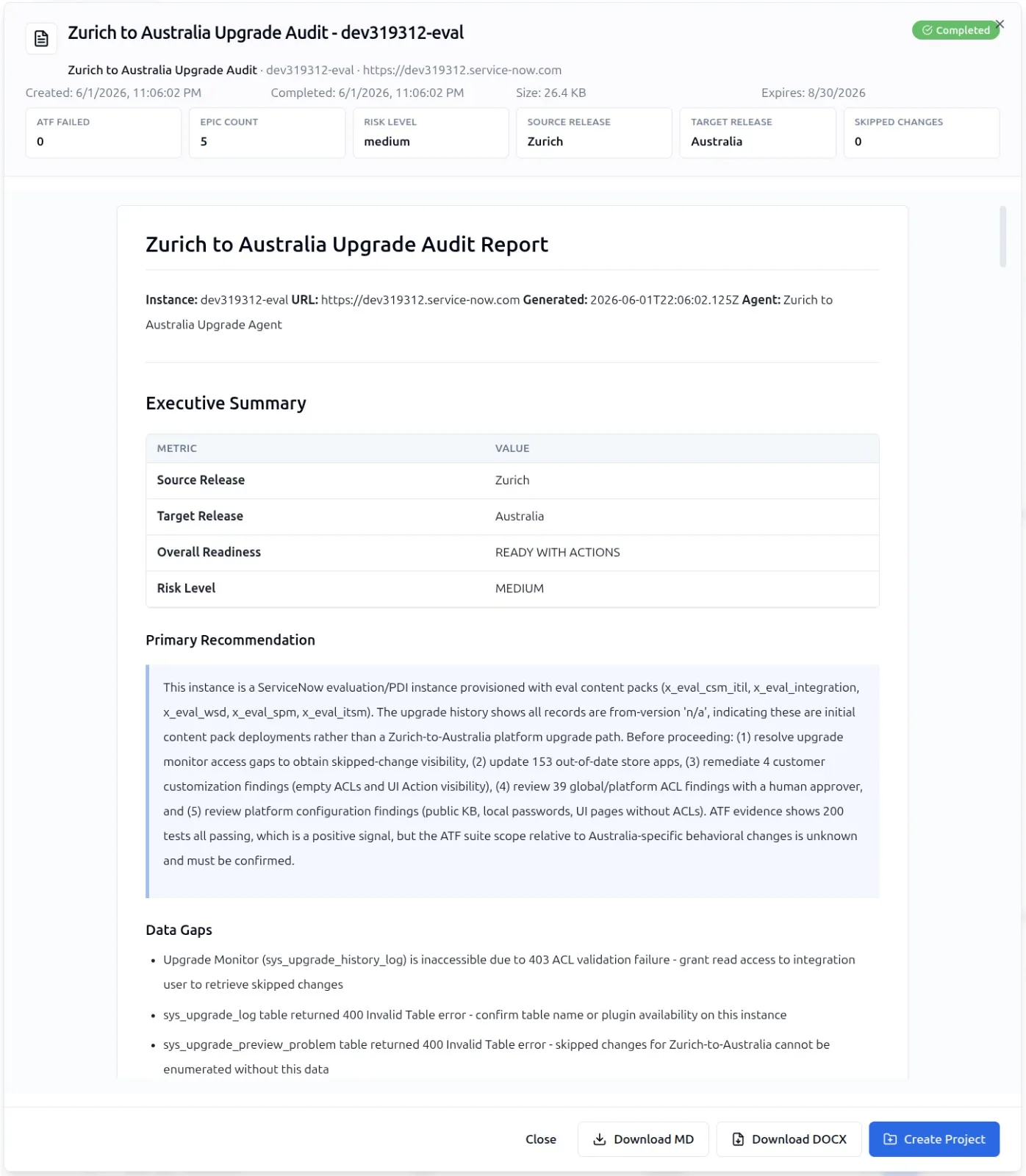
The output is a scored audit report with a risk level for each finding and a remediation backlog you can hand to a developer. The report is grouped by artifact class, ranked by impact, and tagged with the snapshot of sys_upgrade_history that produced it.
Reading the Audit Report
The audit report condenses thousands of sys_upgrade_history_log rows into three primary signals. Each is built from queryable evidence on the instance, with the source rows linked back from every finding.
1. Customization Drift
Skip volume by application and by table. A spike in skips on the Incident table after a release tells you the platform tried to update Incident behavior and your customizations blocked it. The agent ranks these by whether the customization is documented, tested, and currently used.
2. Silent Replacements
Rows with type=Replaced deserve review because the platform applied the incoming version for that artifact. If the record had local behavior your team depended on, you need to catch that in sub-prod before the production upgrade window.
3. Plugin and Store App Risk
The agent cross-references skipped customizations against installed Store apps. If a skipped record sits inside an app scope, the customization may not survive the next store app update either. This is the single most common cause of post-upgrade regressions in our 500+ granular checkpoint set.
Turning the Audit into a Backlog
The Upgrade Readiness Agent does not stop at scoring. It generates a remediation backlog grouped by risk, with concrete next steps for each finding. A typical backlog item includes:
- The artifact name and sys_id, plus the linked sys_upgrade_history_log row.
- A summary of what the customization does, generated by the 100,000+ vector ServiceNow knowledge base.
- A recommended action: keep, refactor to scoped app, retire to OOB, or migrate to Flow Designer.
- Effort estimate in story points, validated against the 291-story build benchmark.
Push the backlog to your build pipeline and let the Yeti Build Agent draft the refactor. This is where the audit becomes work that actually closes.
Practical Cadence
A healthy upgrade rhythm uses sys_upgrade_history_log at three points:
- Pre-upgrade: baseline scan to identify customizations likely to be skipped on the inbound release.
- Post-upgrade in sub-prod: full audit, remediate everything tagged high risk, retest with ATF.
- Post-upgrade in production: verify that the production log matches the sub-prod baseline. Variance means scoped differences you missed.
If you are running N-1 compliance, this cadence runs for every planned family upgrade and for any patch where the affected products matter to your instance. The Upgrade Readiness Agent makes that workload manageable. Read the related N-1 compliance guide for the policy context.