
What N-1 Compliance Actually Means
N-1 compliance is ServiceNow's policy that customers should be no more than one major release behind the current general availability version. ServiceNow support guidance says instances on the current family or previous family are not impacted by the end-of-life upgrade program. Once an instance falls to N-2 or older, upgrade, patch, and Store-app planning becomes materially harder.
For most enterprise ServiceNow customers, the N-1 window is short enough to feel uncomfortable. A typical regulated organization has change advisory boards, freeze windows, performance test plans, and an external auditor signing off on the production cutover. Some teams upgrade every family; others time one well-planned upgrade before the current N-1 family falls out of the supported window.
The good news is that the work compresses if you treat upgrade readiness as a continuous discipline instead of a project. The Upgrade Readiness Agent is built for that discipline.
Why N-1 Slipping Hurts More Than People Think
Customers who slip to N-2 or N-3 often justify it as a calculated risk. In practice the costs compound:
- Patch friction. Critical fixes target the two newest families. Older instances need backports, which slows your security response.
- Store app gaps. Many third-party Store apps drop support for older releases inside one cycle. You either freeze the app, fork it, or upgrade.
- Bigger upgrade jumps. A two-family jump compounds skip volume in sys_upgrade_history_log. Customers see 2-3x the remediation work compared to N-1.
- Audit exposure. SOX, ISO 27001, and SOC 2 reviewers increasingly ask for a documented upgrade cadence. Slipping invites findings.
The Upgrade Readiness Agent is the cheapest insurance against ever needing to make a multi-family jump.
The Continuous Readiness Model
Continuous readiness means the work that traditionally lived in a 12-week upgrade project is spread across the year. The Upgrade Readiness Agent shifts the workload by surfacing risk on a steady cadence rather than during the final lab cycle.
| Cadence | Activity | Output |
|---|---|---|
| Weekly | Instance scan delta against last scan. | Drift trend, new customizations to review. |
| Monthly | Plugin and Store app upgrade compatibility check. | List of apps that will block the next upgrade. |
| Per upgrade window | Full Upgrade Readiness Agent run, pre and post. | Scored audit report with remediation backlog. |
| Quarterly | Customization retirement review. | Backlog of customizations to retire to OOB. |
What the Upgrade Readiness Agent Does
The Upgrade Readiness Agent is one of the eight MSP Agents (six scheduled, two on-demand). It is built to be run on demand at any point in the upgrade window, and it pulls from five sources simultaneously:
- sys_upgrade_history_log: per-record skip, replace, revert dispositions.
- Upgrade Center: the Skipped Changes, Resolved Skips, and ATF coverage panels.
- Instance scan: the live scan results, deduped against prior scans.
- ATF results: regression coverage on the affected code paths.
- Plugins, Store apps, update sets: the upgrade graph that frames the whole exercise.
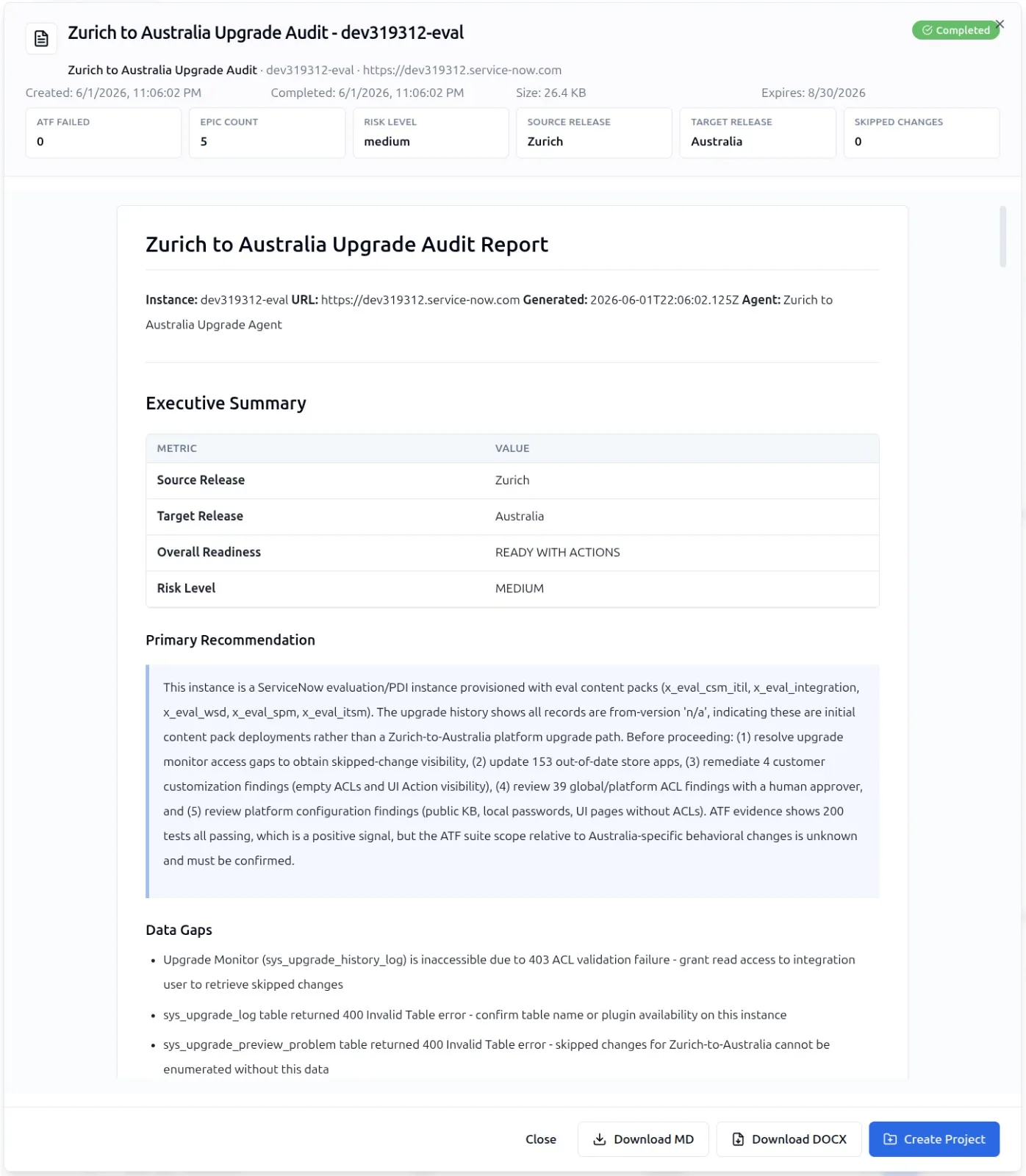
The output is a scored audit report with a risk level on every finding and a remediation backlog ready for sprint planning. The 500+ granular checkpoints in Instance Audit are the rubric the report scores against, so two consecutive runs are directly comparable.
Building a Two-Upgrade-a-Year Calendar
ServiceNow ships major families roughly twice a year. A two-upgrade-a-year calendar maps cleanly to that cadence and keeps you safely on N, while a one-upgrade cadence can still keep you inside N-1 if it is planned before the current previous family ages out.
A sample year for a customer on Zurich, scheduling the production move to Australia after Australia GA and early patches:
- T-12 weeks: Upgrade Readiness Agent run on the current production instance. Identify the high-risk customizations that will skip.
- T-10 weeks: remediation backlog hits the build queue. Yeti Build Agent drafts refactors against the 42 artifact classes in scope.
- T-6 weeks: sub-prod upgrade. Re-run the agent. Diff against the pre-upgrade scan.
- T-4 weeks: ATF regression, instance scan, and security audit. All driven from the same scored report.
- T-2 weeks: change control sign-off. The Upgrade Readiness Agent report is the artifact you submit.
- T-0: production upgrade. Post-upgrade verification runs the agent one more time to confirm no surprises.
For more on the cadence itself, see the ServiceNow release cycle 2026 guide.
What Auditors Look For
When an external auditor asks for evidence that you are on a supported release, the strongest answer is a versioned series of Upgrade Readiness Agent reports. Each report shows:
- The release the instance was on when scanned, with sys_upgrade_history references.
- The list of customizations reviewed and their classification.
- The score against the 500+ checkpoint set.
- The remediation backlog and its disposition (closed, in progress, accepted risk).
That sequence answers the auditor's question without you having to assemble the evidence by hand. The Standard tier already gives you Yeti Chat and MCP. The Upgrade Readiness Agent ships with the Enterprise tier and above. See pricing for the full tier matrix.
What to Stop Doing
Customers stuck in upgrade churn usually have one of three habits. Drop all of them.
- Treating upgrades as a project: they are not. They are a cadence. Project economics collapse when the project repeats twice a year.
- Manually reading sys_upgrade_history_log line by line: the volume defeats human attention. Use an agent that ranks for you.
- Skipping post-upgrade scans: the production scan is the only one that matters for audit. Run it every time.
Continuous readiness pays back the first time you do not have to escalate a CAB rejection on the day of cutover. After that, it is just normal.