
The Core Loop
Every GlideRecord query follows the same five-step shape. Memorize it and the rest of this cheat sheet is just variations on the theme.
var gr = new GlideRecord('incident');           // 1. choose the table
gr.addQuery('active', true);                    // 2. filter
gr.addQuery('priority', '<=', 2);
gr.orderByDesc('sys_created_on');               // 3. order
gr.setLimit(100);                               // 4. limit
gr.query();
while (gr.next()) {                             // 5. iterate
    gs.info(gr.getValue('number'));
}
The pattern works the same in Business Rules, Script Includes, Scheduled Jobs, and Flow Designer Script steps. Keep the shape, change the table.
The Method Table
The methods you use 95% of the time, with one-liner examples. Bookmark this section.
| Method | Purpose | Example |
|---|---|---|
addQuery(field, op, val) | Filter rows. | gr.addQuery('state', '!=', 7) |
addEncodedQuery(str) | Apply a sysparm_query string. | gr.addEncodedQuery('active=true^priority=1') |
addOrCondition(field, op, val) | OR clause off the last addQuery. | q.addOrCondition('state', 2) |
addNullQuery(field) | Field IS NULL. | gr.addNullQuery('assigned_to') |
addNotNullQuery(field) | Field IS NOT NULL. | gr.addNotNullQuery('assigned_to') |
orderBy / orderByDesc | Sort. | gr.orderByDesc('sys_created_on') |
setLimit(n) | Cap the row count. | gr.setLimit(100) |
chooseWindow(first, last) | Server-side pagination window. | gr.chooseWindow(0, 50) |
query() / _query() | Execute. Use _query only for edge cases such as tables with a field named query. | gr.query() |
next() / hasNext() | Iterate / lookahead. | while (gr.next()) {...} |
get(sys_id) / get(field, val) | Fetch a single record. | gr.get('number', 'INC0010001') |
getValue(field) | Raw string value. | gr.getValue('state') |
getDisplayValue(field) | Display value. | gr.getDisplayValue('assigned_to') |
setValue(field, val) | Set without dot notation. | gr.setValue('state', 7) |
insert() / update() | Write changes. | gr.update() |
deleteRecord() / deleteMultiple() | Delete one or all matched rows. | gr.deleteMultiple() |
getRowCount() | Count after query (post-execute). | gr.getRowCount() |
setWorkflow(false) | Disable business rules, script engines, or audit for this operation. Use carefully. | gr.setWorkflow(false) |
autoSysFields(false) | Suppress sys_updated_on bumps. | gr.autoSysFields(false) |
initialize() | Fresh row, ready for insert. | gr.initialize() |
Query Operators
The operator argument in addQuery() supports the full set you would expect from a SQL-ish DSL. The unfamiliar ones are usually the ones that bite you.
gr.addQuery('field', '=', 'val');        // equals (default)
gr.addQuery('field', '!=', 'val');       // not equal
gr.addQuery('field', '>', 100);          // greater than
gr.addQuery('field', '<', 100);          // less than
gr.addQuery('field', '>=', 100);
gr.addQuery('field', '<=', 100);
gr.addQuery('field', 'IN', '1,2,3');     // value in list (string CSV)
gr.addQuery('field', 'NOT IN', '1,2,3');
gr.addQuery('field', 'STARTSWITH', 'abc');
gr.addQuery('field', 'ENDSWITH', 'xyz');
gr.addQuery('field', 'CONTAINS', 'foo');
gr.addQuery('field', 'DOES NOT CONTAIN', 'foo');
gr.addQuery('field', 'ISEMPTY');
gr.addQuery('field', 'ISNOTEMPTY');
For complex conditions, lean on addEncodedQuery. Build the filter visually in a list view, copy the URL's sysparm_query, and paste it into the script. It is the fastest path from requirement to working query.
Aggregations with GlideAggregate
When you need a count, sum, or group-by, use GlideAggregate instead of looping. It runs the aggregation in the database, not in your script.
var agg = new GlideAggregate('incident');
agg.addQuery('active', true);
agg.addAggregate('COUNT');
agg.addAggregate('AVG', 'reopen_count');
agg.groupBy('assignment_group');
agg.orderByAggregate('COUNT');
agg.query();
while (agg.next()) {
    gs.info(agg.getDisplayValue('assignment_group') +
            ' count=' + agg.getAggregate('COUNT') +
            ' avg_reopens=' + agg.getAggregate('AVG', 'reopen_count'));
}
GlideRecordSecure vs GlideRecord
GlideRecord bypasses ACLs in server-side script execution by default. GlideRecordSecure enforces them. Use GlideRecordSecure any time the requesting user's permissions are relevant - typically inside scoped apps, REST APIs, and Service Portal widgets.
var sec = new GlideRecordSecure('incident');
sec.addQuery('active', true);
sec.query();
while (sec.next()) {
    // Only rows the running user can actually read.
}
A common audit finding is a Script Include that uses plain GlideRecord and exposes data outside the requester's role. The 500+ checkpoints in Instance Audit flag this pattern automatically.
Performance Patterns
Use setLimit on exploratory queries
var gr = new GlideRecord('sys_audit');
gr.setLimit(10); // never iterate the whole audit table
gr.query();
Use updateMultiple for bulk writes
var gr = new GlideRecord('incident');
gr.addQuery('assignment_group', oldGroup);
gr.setValue('assignment_group', newGroup);
gr.updateMultiple(); // one DB op instead of N
Avoid N+1 lookups inside loops
// Bad: one query per incident
while (incidents.next()) {
    var user = new GlideRecord('sys_user');
    user.get(incidents.getValue('caller_id'));
    gs.info(user.getValue('email'));
}

// Better: collect sys_ids and query users once
var callerIds = [];
while (incidents.next()) {
    callerIds.push(incidents.getValue('caller_id'));
}

var users = new GlideRecord('sys_user');
users.addQuery('sys_id', 'IN', callerIds.join(','));
users.query();
while (users.next()) {
    gs.info(users.getValue('email'));
}
Use orderBy plus setLimit, not chooseWindow alone
chooseWindow without an explicit orderBy returns rows in undefined order. For pagination always pair them.
Five Copy-Paste Recipes
1. Most recent record matching a condition
var gr = new GlideRecord('incident');
gr.addQuery('caller_id', user.sys_id);
gr.orderByDesc('sys_created_on');
gr.setLimit(1);
gr.query();
if (gr.next()) { /* use gr */ }
2. Count by group
var agg = new GlideAggregate('incident');
agg.addAggregate('COUNT');
agg.groupBy('priority');
agg.query();
while (agg.next()) {
    gs.info('P' + agg.getValue('priority') + ': ' + agg.getAggregate('COUNT'));
}
3. Bulk close stale incidents
var gr = new GlideRecord('incident');
gr.addEncodedQuery('active=true^sys_updated_on<javascript:gs.daysAgo(30)');
gr.setValue('state', 7);
gr.setValue('close_notes', 'Auto-closed - 30+ days inactive');
gr.updateMultiple();
4. Dedupe a reference cache
var seen = {};
var gr = new GlideRecord('incident');
gr.addQuery('active', true);
gr.query();
while (gr.next()) {
    var caller = gr.getValue('caller_id');
    if (seen[caller]) continue;
    seen[caller] = true;
    // do work once per unique caller
}
5. Safe single-record fetch
var gr = new GlideRecord('cmdb_ci');
if (gr.get(ciSysId)) {
    gs.info('Found ' + gr.getDisplayValue());
} else {
    gs.warn('CI ' + ciSysId + ' not found');
}
When AI Helps More Than the Docs
Most GlideRecord bugs are not about the API. They are about the data: a missing field, a deactivated user, a circular reference. Yeti Chat is most useful when you paste an error and ask it to explain what your query is actually returning given your instance's real schema.
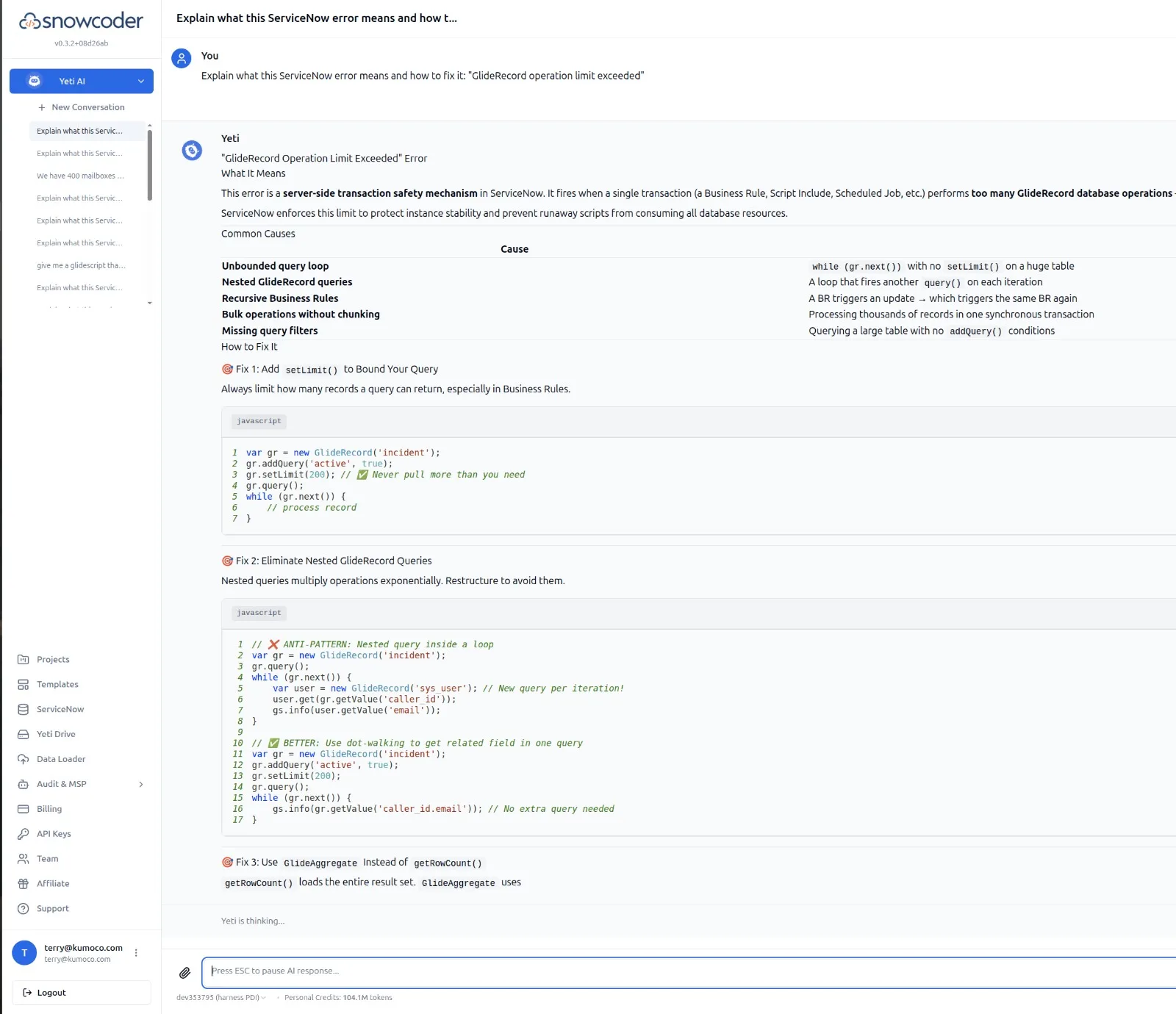
SnowCoder's 60% accuracy advantage over generic LLMs across 120+ ServiceNow benchmarks comes from grounding in a 100,000+ vector ServiceNow knowledge base, plus live MCP context. Read more about the benchmark methodology or the MCP integration.