
The Old Way: A Six-Week Discovery Spiral
The traditional ServiceNow upgrade preparation looks the same in every shop. An architect logs into the source instance, opens Upgrade Center, exports the skipped changes list, opens the instance scanner, downloads the ATF results, cross-references plugins against the target release, and stares at update sets that have not been committed since the last upgrade. Two analysts spend three weeks tagging each finding by risk. By the time the upgrade window is booked, the team has a slide deck and very little actionable engineering.
That is the pattern the SnowCoder Upgrade Readiness Agent was built to break. Going from Zurich to Australia is an adjacent family upgrade, but it still touches the release-note surface for every product, plugin, Store app, custom app, ATF suite, and integration you run. The agent does the discovery, the scoring, and the backlog drafting in one continuous run, in hours rather than weeks.
This article walks through what the agent collects, what it produces, and how the output drops directly into your sprint.
What the Upgrade Readiness Agent Actually Pulls
The Upgrade Readiness Agent is one of two on-demand agents in the SnowCoder MSP Agents suite (the other being the Instance Audit Agent). When you point it at an instance, it harvests data from six distinct sources and reconciles them.
- Upgrade Center: The native Upgrade Center records, including target release metadata, current upgrade state, and previously deferred changes.
- sys_upgrade_history_log: The historical record of every upgrade artifact the platform has touched, including skipped, reverted, and merged changes. This is the table that tells you which OOB files have been customised.
- Instance scan results: ServiceNow's built-in instance scanner output, including best-practice violations and upgrade-blocking findings.
- ATF results: The latest Automated Test Framework runs, with pass and fail counts per suite. The agent counts failed tests as a leading indicator of regression risk.
- Plugins and store apps: All activated plugins and installed store applications, cross-referenced against the target release's compatibility data.
- Update sets: Open, in-progress, and committed update sets, including any that conflict with platform changes in the upgrade.
Each of these sources answers a different question. Reconciled together, they answer the only question that matters: how risky is this upgrade and what specifically needs to be fixed.
The Scored Upgrade Audit Report
The first artifact the agent produces is the Upgrade Audit Report. It opens with a single risk level (Low, Medium, High, Critical), the source release, and the target release. Below that header is a structured breakdown that any architect can hand straight to a steering committee.
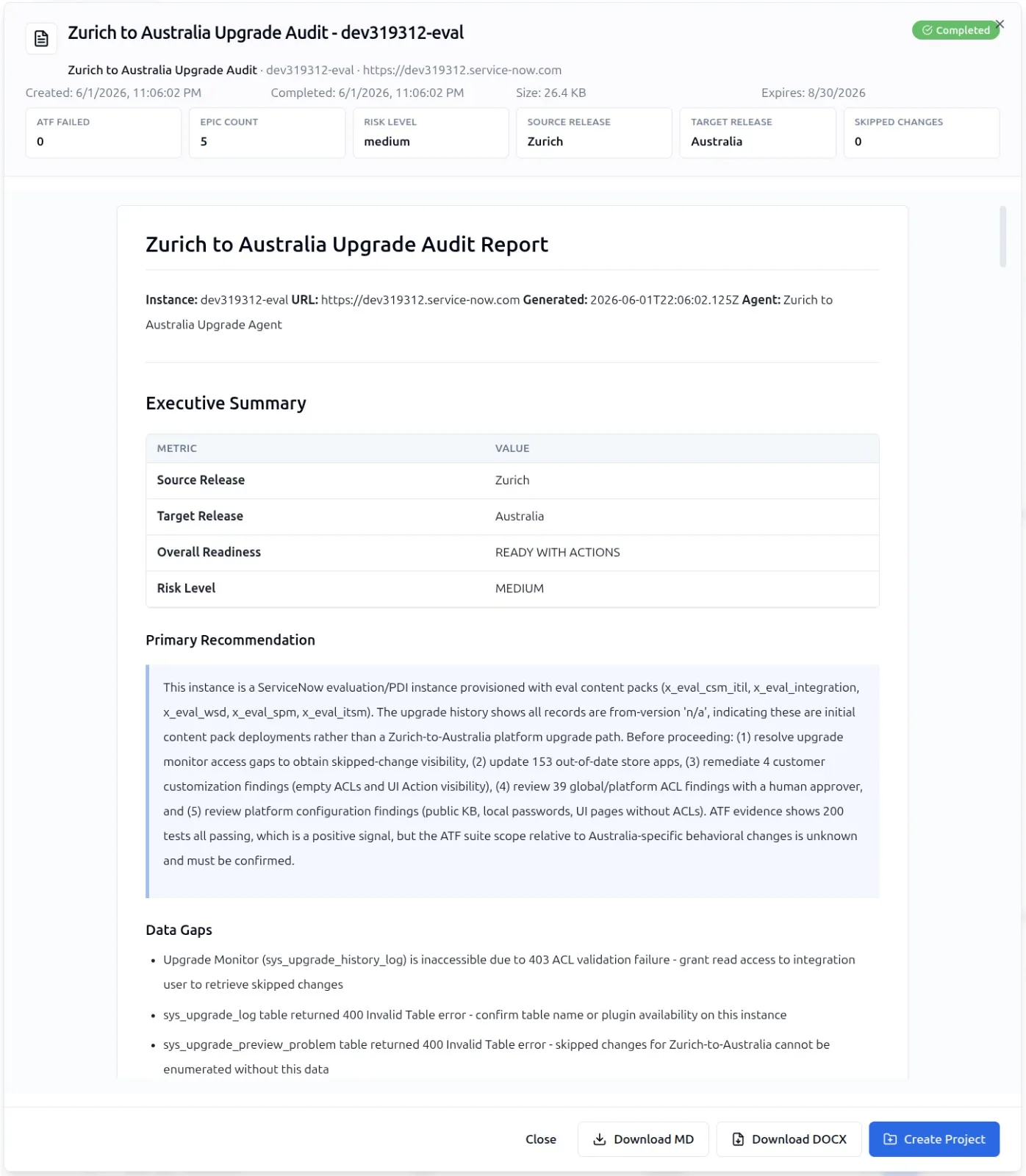
The report quantifies the six dimensions the agent gathered. For a typical Zurich source instance moving to Australia, you will see numbers like these called out at the top of the document:
- Skipped changes: The count of OOB artifacts the platform skipped because they had been customised. Each one is a future merge conversation.
- ATF failed count: Total tests that failed in the most recent ATF run. The agent links each failure to the artifact under test so the remediation owner is unambiguous.
- Epic count: The number of distinct workstreams the agent recommends for the remediation programme. Each epic groups related stories.
- Plugin compatibility: A pass/fail flag for every activated plugin against the Australia release.
- Store app drift: Store apps that need a version upgrade or are not yet certified for the target release.
The risk level at the top is not a vibe check. It is a weighted score derived from the six inputs, with skipped changes and ATF failures carrying the heaviest weight because they correlate most strongly with post-upgrade defects.
The AI-Enhanced Remediation Backlog
A scored audit is useful, but a backlog is what your team actually executes. The second artifact the Upgrade Readiness Agent produces is an AI-Enhanced backlog of remediation stories. Each finding in the audit report is mapped to one or more stories. Each story has an acceptance criteria block, a suggested owner role, and an effort estimate.
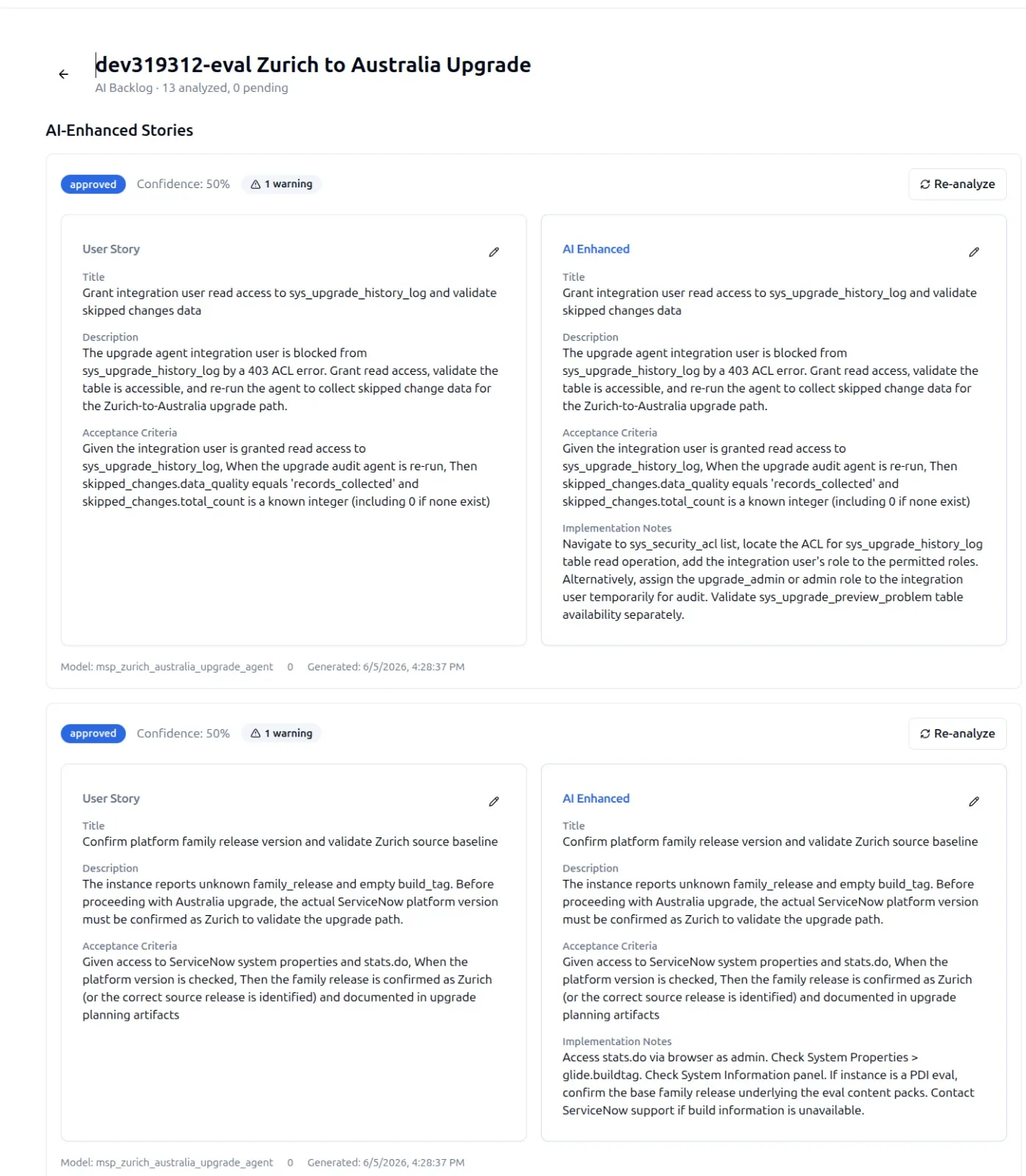
Suppose the audit found that the platform skipped a customised Business Rule on the incident table. The agent does not just log a finding. It writes a story like this.
Story: Reconcile skipped customisation on incident.business_rule.priority_lookup

Context:
  Source release: Zurich
  Target release: Australia
  Artifact: sys_script (priority_lookup, sys_id 1a2b3c4d...)
  Skipped because: customer override present since release v2.

Acceptance criteria:
  - Diff the v2 customisation against the Australia OOB version.
  - Reapply the business intent (priority calc on impact + urgency)
    using the Australia API surface.
  - All ATF tests in the suite "Incident SLA" pass.
  - Update set sealed and ready for promotion.

Suggested owner: Senior ServiceNow Developer
Effort: M (1-2 days)
Multiply that pattern across every skipped change, every ATF failure, and every store app that needs a version bump, and the agent has drafted a sprint or two of work that an engineering lead can sense-check rather than write from scratch.
The backlog is ready to import into your tracker. Stories link back to the audit findings so the audit trail from risk to remediation is intact.
Where the Agent Stops and the Architect Starts
The Upgrade Readiness Agent does the heavy data work and the first-pass narrative. It does not commit the remediation. The architect still owns the decisions: which stories go in the next sprint, which can be deferred, and which warrant a deeper conversation with the customer or store app vendor.
For each skipped change the agent has flagged, an architect can drop into Yeti Chat and run a deeper analysis using a GlideRecord query like the one below to inspect the affected records directly.
var gr = new GlideRecord('sys_upgrade_history_log');
gr.addQuery('disposition', 'SKIPPED');
gr.addQuery('sys_created_on', '>=', gs.beginningOfLastMonth());
gr.orderByDesc('sys_created_on');
gr.query();

while (gr.next()) {
    gs.info(
        gr.getValue('file_name') + ' | ' +
        gr.getValue('type') + ' | ' +
        gr.getValue('disposition')
    );
}
The agent gives you the list. Yeti Chat gives you the explanation. Together that is the workflow that closes the gap between discovery and remediation.
Why a Day Is Possible
The thing that historically made upgrade prep a six-week exercise was not the analysis. It was the data wrangling. Pulling each input into a usable form, joining the records by artifact, and writing the findings in a narrative voice that a steering committee could read. The Upgrade Readiness Agent collapses every step of that pipeline. The data sources are queried in parallel. The reconciliation is automatic. The narrative is drafted from the same SnowCoder model that backs Yeti Build Agent, with its 100,000-plus vector ServiceNow knowledge base and 17,000-plus code examples behind it.
For Zurich to Australia, that is the difference between starting your upgrade conversation tomorrow morning and starting it after the next quarterly steering committee.