
Beyond the Basics
You've used SnowCoder to generate Business Rules and query your instance. Now it's time to unlock its full potential.
This guide covers advanced prompting techniques, power user features, and strategies that transform SnowCoder from a helpful assistant into an indispensable development partner.
Understanding How SnowCoder Thinks
Before diving into techniques, it helps to understand what happens when you send a message.
The Four-Tier Context System
Every prompt you send is enriched with four layers of context:
| Tier | Content |
|---|---|
| Tier 1 | ServiceNow guidelines |
| Tier 2 | Yeti ServiceNow trained knowledge base |
| Tier 3 | Your instance's metadata (tables, fields) |
| Tier 4 | Conversation history |
This means SnowCoder knows:
- ServiceNow best practices and anti-patterns
- Your actual table structures and field definitions
- What you've discussed and built in this conversation
- Security patterns and validation requirements
Power User Insight: Your prompts don't need to include basic context. SnowCoder already knows your instance schema and ServiceNow conventions.
General Mode vs Guru Mode (and the two newer modes)
Editor's note (2026-06): SnowCoder now offers four Yeti Chat modes - General, Guru, Thinking, and Fast. This section covers General and Guru in depth (still the most common choice for most tasks); the two newer modes are covered in Yeti AI Modes: General, Guru, Thinking, Fast. Yeti Chat is available on every tier (Standard, Enterprise, and Enterprise+); Yeti Build Agent and MSP Agents are Enterprise.
General and Guru use different AI models optimised for different tasks. To toggle between them, look for the dropdown to the right of the main message box.
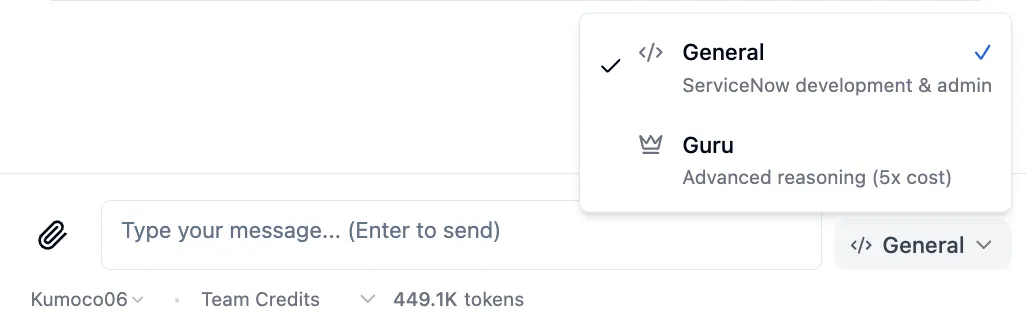
General Mode
- Fast, cost-effective
- Excellent for: Business Rules, Client Scripts, queries, code review
- Best when you know what you want and need it built quickly
Guru Mode
- Deep reasoning, more thorough analysis
- Excellent for: Architecture design, security frameworks, performance optimization
- Best when you need Yeti to think through complex trade-offs
When to switch to Guru Mode:
- Designing multi-instance architectures
- Security audits and hardening strategies
- Complex data migration planning
- Performance root-cause analysis
- Decisions with significant business impact
The Art of Effective Prompting
Pattern 1: Be Specific About Timing and Context
Generic prompts get generic results. Specific prompts get production-ready code.
✘ Vague:
Create a business rule for incidents
✔ Specific:
Create a BEFORE INSERT business rule on the Incident table that:
- Validates priority is between 1-5
- Auto-sets assignment group based on category using the Category-Group mapping table
- Prevents submission if short_description is empty
- Logs validation failures to the system log
The specific prompt triggers correct business rule timing, proper validation patterns, error handling best practices, and logging conventions.
Pattern 2: Reference Your Instance Data
SnowCoder is connected to your instance. Use that.
✘ Generic:
Show me how to query users
✔ Instance-Aware:
Query our sys_user table and show me users in the 'IT Support' department who haven't logged in for 90 days. Include their manager and last login date.
SnowCoder will query your actual sys_user table, return real data from your instance, and format results with the fields you requested.
Pattern 3: Chain Related Requests
SnowCoder maintains conversation context. Use previous outputs as building blocks.
Message 1: "List all incidents assigned to the Network team from last week"
→ SnowCoder returns 47 incidents
Message 2: "Which of these have been idle for more than 3 days?"
→ SnowCoder filters the same 47 incidents
Message 3: "Update those idle ones with a reminder note"
→ SnowCoder updates the filtered subset
Message 4: "Now create a scheduled job that does this automatically every Monday"
→ SnowCoder generates a scheduled script based on the entire workflow
Pattern 4: Specify Output Format
Tell SnowCoder exactly what you need.
- For code: Generate a Script Include with JSDoc comments, error handling, and a usage example in the header comment
- For data: Export these incidents as CSV with columns: number, priority, assigned_to (display value), state, sys_created_on
- For documentation: Create markdown documentation including: Overview, Configuration steps, API endpoints, Error codes, Troubleshooting guide
Pattern 5: Include Constraints
Constraints focus the AI on what matters most.
Optimize this GlideRecord query with these constraints:
- Must complete in under 500ms
- Cannot use encoded queries (our policy)
- Must work with ACLs enabled
- Should handle tables with 100K+ records
Working Sets: The Power Feature You're Not Using
Working Sets are SnowCoder's secret weapon for safe data operations.
What They Are
When you list or query records, SnowCoder automatically creates a "working set," a snapshot of those exact records. Any subsequent operations use this snapshot, not a new query.
Why This Matters
Without Working Sets (Dangerous)
10:00 AM - You list 50 incidents
10:15 AM - Someone creates 20 new incidents
10:30 AM - You say "delete these"
→ Might delete 70 incidents!
With Working Sets (Safe)
10:00 AM - You list 50 incidents → Working Set created
10:15 AM - Someone creates 20 new incidents
10:30 AM - You say "delete these"
→ Only original 50 deleted
How to Use Working Sets Effectively
Explicit Scope Confirmation:
You: "Show me all P1 incidents from this week"
SnowCoder: Returns 23 incidents
You: "Update these to add a VIP flag"
SnowCoder: "I'll update the 23 incidents in your current working set. Proceed?"
Refreshing Your Working Set:
You: "Actually, re-query to get the latest P1 incidents"
→ New working set created with current data
You: "Now update these"
→ Uses the fresh working set
Note: Working sets are per-table. You can have active working sets for incidents, changes, and users simultaneously.
Advanced Tool Patterns
Pattern: The Query-Confirm-Execute Flow
For any destructive operation, SnowCoder follows this pattern:
- Query records (creates working set)
- Show you exactly what will be affected
- Wait for your confirmation
- Execute the operation
- Report results
Pattern: Parallel Tool Execution
SnowCoder can execute multiple operations simultaneously.
Single Request, Multiple Actions:
"Generate three reports:
1. All incidents by priority (CSV)
2. User access audit for IT department (JSON)
3. Change success rate by category (Markdown)"
SnowCoder generates all three files in parallel, delivering them together.
Pattern: Instance Comparison
Compare configurations across instances:
"Compare the Incident table ACLs between DEV and PROD instances. Show me what's different and what needs to be promoted."
SnowCoder queries both instances and generates a comparison showing ACLs only in DEV (need promotion), only in PROD (possibly deleted), and with differences (need review).
Context Window Mastery
SnowCoder has a 200K token context window. Here's how to use it effectively.
Strategy 1: Deep Research Sessions
For complex investigations, load extensive context:
"I'm investigating why our CMDB data quality has degraded. Let's do a comprehensive analysis:
1. List all CI types with record counts
2. Show me CIs without relationships
3. Find duplicate CIs by name
4. Identify CIs with stale discovery data
5. Check for orphaned relationships
Keep all this context as we work through remediation."
Strategy 2: Prompt Caching for Cost Efficiency
SnowCoder caches system prompts for 5 minutes. Related requests within this window cost 90% less.
Cost-Efficient Pattern:
10:00:00 - First query (full cost)
10:01:30 - Follow-up (90% cheaper - cached)
10:03:00 - Another follow-up (90% cheaper - cached)
10:04:30 - Final request (90% cheaper - cached)
Pro Tip: Batch related work into focused sessions rather than spreading queries throughout the day.
Strategy 3: Reference Previous Artifacts
Point to earlier work in your conversation:
"Apply the same validation pattern from the Business Rule we created earlier to this new Client Script"
"Use the same error handling approach from the Script Include, but adapt it for async execution"
Advanced Code Generation
Generating Complete Solutions
Instead of asking for pieces, request complete implementations:
"Create a complete integration between ServiceNow and Jira:

Components needed:
1. Script Include for API communication (with retry logic)
2. Business Rule to sync on incident creation
3. Scheduled Job for nightly reconciliation
4. Custom table to track sync status
5. Error notification to integration team

Requirements:
- Use OAuth 2.0 authentication
- Handle rate limiting gracefully
- Log all API calls for debugging
- Support both create and update sync
- Include rollback capability"
SnowCoder generates all five components with consistent patterns, shared utilities, and proper error handling across the entire solution.
Generating Update Sets
Request deployment-ready artifacts:
"Export all the scripts we've created in this conversation as an Update Set that I can import into PROD"
Guru Mode Deep Dives
Architecture Design
"Design a ServiceNow architecture for a company with:
- 3 regional instances (Americas, EMEA, APAC)
- Central reporting requirements
- Different data residency laws per region
- Single sign-on across all instances
- Master data governance from HQ
Provide: High-level architecture diagram, Data flow for incident creation, Governance model, Disaster recovery approach, Implementation phases"
Performance Optimization
"Our ServiceNow dashboard takes 45 seconds to load. Components:
- List widget: All incidents (50K records)
- Chart: Incident trends by category
- Scorecard: SLA compliance
- Global search across 10 tables
Analyze potential causes and provide: Specific optimizations with code, Expected improvement per change, Implementation priority, Monitoring approach"
Security Hardening
"Conduct a security review for our ServiceNow instance. Current state:
- 500 users across 10 departments
- 8 external integrations
- Customer portal active
- Mobile app enabled
Analyze and provide: ACL vulnerability assessment, Integration security improvements, Data exposure risks, Encryption recommendations, Compliance gaps (SOC2, GDPR), Remediation roadmap"
Real-World Power User Scenarios
Scenario 1: Bulk Data Cleanup
Goal: Clean up 5 years of accumulated test data
You: "Find all incidents where short_description contains 'TEST' or 'TESTING', created more than 1 year ago, in Resolved or Closed state"
SnowCoder: "Found 3,847 incidents matching your criteria"
You: "Export these to CSV first as a backup"
SnowCoder: [Generates downloadable CSV]
You: "Now delete these incidents"
SnowCoder: "This will permanently delete 3,847 incidents. Proceed?"
You: "Yes"
SnowCoder: "Successfully deleted 3,847 incidents"
Safe, auditable, reversible (you have the CSV backup).
Scenario 2: Compliance Audit Preparation
Goal: Generate evidence for SOC2 audit
You: "I need to prepare for a SOC2 audit. Generate reports for: All users with admin roles, ACL changes in the last 90 days, Failed login attempts by user, All scheduled jobs and their owners, Data export/import activity"
SnowCoder: [Generates 5 reports in parallel]
You: "Now create a summary document that maps each report to the relevant SOC2 control"
SnowCoder: [Generates compliance mapping document]
Audit preparation that would take days, completed in minutes.
Scenario 3: Emergency Incident Response
Goal: Quickly identify and fix a production issue
You (Guru Mode): "We're getting reports of slow incident creation. Query the last hour of incidents and identify: Average creation time, Any patterns in slow creations, Business Rules that fire on incident insert, Any recent changes to those Business Rules"
SnowCoder: [Analyzes data] "Found that BR 'Auto-Assignment' was modified yesterday and now includes a synchronous GlideAjax call that's adding 3-4 seconds per incident."
You: "Show me the problematic code and suggest a fix"
SnowCoder: [Shows before/after with async pattern]
You: "Generate an Update Set with the fix"
SnowCoder: [Creates deployable Update Set]
Root cause analysis to deployed fix in one conversation.
Prompt Templates for Common Tasks
Business Rule Template
Create a [TIMING] business rule on the [TABLE] table that:
- Triggers when [CONDITION]
- Performs [ACTION]
- Handles errors by [ERROR_HANDLING]
- Logs [WHAT_TO_LOG]
Client Script Template
Create an [EVENT_TYPE] client script for the [TABLE] form that:
- Watches the [FIELD] field
- When [CONDITION], performs [ACTION]
- Shows message: "[MESSAGE]"
- Uses async pattern for any server calls
Integration Template
Create an integration with [EXTERNAL_SYSTEM]:
- Direction: [INBOUND/OUTBOUND/BIDIRECTIONAL]
- Trigger: [EVENT/SCHEDULE/ON-DEMAND]
- Authentication: [OAUTH/BASIC/API_KEY]
- Data: [WHAT_TO_SYNC]
- Error handling: [RETRY/NOTIFY/LOG]
Common Mistakes to Avoid
Mistake 1: Ignoring Mode Selection
Using General Mode for architecture decisions, or Guru Mode for simple queries.
Fix: Match the mode to the task complexity.
Mistake 2: Overly Vague Prompts
"Help with incidents" tells SnowCoder nothing useful.
Fix: Include table names, field names, conditions, and expected outcomes.
Mistake 3: Not Using Working Sets
Asking to "delete the incidents" without first establishing which incidents.
Fix: Always list/query first, then operate on the working set.
Mistake 4: Not Exporting Before Destructive Changes
Deleting data without a backup.
Fix: Always request a CSV export before bulk deletes.
Key Takeaways
- Specificity wins: Detailed prompts get production-ready results
- Use your instance context: SnowCoder knows your schema, use it
- Chain requests: Build complex solutions through conversation
- Trust working sets: They prevent accidental data loss
- Match mode to task: Guru for complex, General for routine
- Leverage the context window: 200K tokens means deep analysis
- Batch for efficiency: Related requests in one session save costs
- Always confirm before destructive ops: Read the scope carefully
- Export before delete: Backups are free, regret is expensive
- Request validation feedback: Catch issues before deployment
What's Next?
You now have the techniques to use SnowCoder at an advanced level. The next step is practice. Take your most complex ServiceNow challenge and work through it conversationally.
Start with Guru Mode for your next architecture decision. Use working sets for your next bulk update. Request validation feedback on your next script.
The more you use these patterns, the more natural they become, and the more SnowCoder becomes an extension of your development capability.